
DrayTek · V2928BE-K · SKU WS-NET-DRAYTEK-V2928BE-K
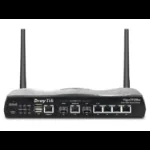
DrayTek Vigor 2928be Multi-Gigabit Multi-WAN FTTP Router with BE7200 Wireless
DrayTek V2928BE-K is the UK/IE Vigor2928be business router with dual-band WiFi 7, multi-WAN routing, VPN and multi-gigabit wired interfaces.
This model suits an office with an Ethernet handoff from fibre equipment and a need to manage more than one internet connection. The UK/IE datasheet identifies V2928BE-K as the wireless Vigor2928be—not a DSL modem or a built-in 5G SIM router. Plan WAN failover, VLANs and remote access as part of the network design. Its BE7200 label describes combined theoretical wireless PHY rates, not an internet speed promise.
Request availability · Stock, delivery and installation in Nigeria are confirmed before payment.
Ikeja store pickup — confirm availability before travelling
No online payment required to request a reservation. We’ll confirm the item is held before you travel.
WiFi Store · a brand of Palmer Technologies
98 Awolowo Way, Ikeja (Opposite MAN House, Adjacent SLOT HQ), Lagos, Nigeria.
Mon–Sat, 9am–6pm WAT · Sunday closed
WhatsApp / call: 09025073903 · Call
Best for
- Ethernet-delivered fibre internet
- Configured multi-WAN failover and traffic policies
- Business WiFi with compatible clients
Not ideal for
- Connecting a DSL phone line directly
- Using a SIM without a supported external modem
- Expecting every high-speed port to operate simultaneously
Before you buy
- Confirm the actual unit is UK/IE V2928BE-K, its firmware and permitted Nigerian wireless settings before installation.
- Only two of P2, P3 and P4 can be active at once. Plan the SFP+ and copper connections before choosing switches or optics.
- Use the provider’s supported ONT/modem and authentication settings. An SFP+ slot alone does not make this router a provisioned GPON terminal.
- Failover may require calls or VPN sessions to reconnect; two subscriptions do not automatically combine into one faster download.
- Confirm service licences, compatible USB modem support, power adapter and supplied accessories separately.
What problem does this solve?
Manage office WAN connections, separate local networks and provide configured VPN access through one business gateway.
Who it's for: IT-managed small offices and branches that need a documented fibre handoff, wired port plan and VPN configuration.
Recommended use: An office fibre gateway with separately configured backup WAN and segmented staff/guest networks.
Coverage, users and compatibility
- Realistic users
- Size from routing, VPN and wireless workloads; no universal user-capacity guarantee
- Expected coverage
- Indoor WiFi depends on walls, placement, channels and clients; add planned access points when needed
- Supported networks / systems
- Ethernet WAN; external access equipment and ISP provisioning required
- Works with
- Compatible Ethernet clients and WiFi clients; features depend on client support
- Power input
- UK datasheet lists a 100–240 V AC power supply; confirm the supplied adapter and DC connector
- Power backup
- Keep the router, ONT/modem and required switches/APs powered; match the actual adapter before choosing backup
Speeds and ranges are estimates. Your internet provider's signal, walls, interference and installation all affect real results.
Technical specifications
Confirm the exact hardware revision, regional variant and required accessories before payment.
| Regional product code | V2928BE-K (UK/IE Vigor2928be) |
|---|---|
| WiFi standard | IEEE 802.11be / WiFi 7; dual-band 2.4 GHz and 5 GHz |
| Wireless class | BE7200; combined theoretical PHY class, not measured internet throughput |
| P1 | 1 × 1GbE RJ-45 WAN |
| P2 | 1 × 1G/10G SFP+ WAN slot |
| P3 | 1 × 10GbE RJ-45 WAN/LAN switchable |
| P4 | 1 × 1G/10G SFP+ LAN slot |
| P5 | 1 × 2.5GbE RJ-45 LAN (UK specification) |
| P6–P8 | 3 × 1GbE RJ-45 LAN |
| Port-sharing constraint | Only two of P2/P3/P4 can be active at once |
| USB | 2 × USB 2.0; supported external devices required |
| VPN | Up to 50 active tunnels in UK datasheet; workload and configuration limits apply |
| Warranty | Warranty period and coverage for the exact model must be confirmed before payment |
What is included
- UK datasheet lists router, two detachable wireless antennas, quick-start guide, RJ-45 cable and power adapter
- Confirm the actual ordered package; external modem, SFP modules and optional services are not implied included
Related equipment and planning
- Business router alternatives
- Managed network switches
- Office access points
- Network installation services
Manufacturer documentation: DrayTek model datasheet. These are manufacturer references, not WiFi Store benchmark results.
Installation
Installation is recommended for the best result.
See installation servicesDelivery and warranty
Lagos: 1–2 working days; outside Lagos: 3–5 working days after availability is confirmed. Procurement lead time and delivery fees are confirmed separately on WhatsApp before payment. Warranty: Warranty period and coverage for the exact model must be confirmed before payment. Payment is by bank transfer, confirmed on WhatsApp.
Return, refund & exchange policyReviews
No reviews yet. Bought this? Send us your feedback on WhatsApp.
FAQs
How much is DrayTek Vigor 2928be Multi-Gigabit Multi-WAN FTTP Router with BE7200 Wireless in Nigeria?
The listed price for DrayTek Vigor 2928be Multi-Gigabit Multi-WAN FTTP Router with BE7200 Wireless is ₦779,000. Confirm availability, delivery and the final price before payment.
Does V2928BE-K have a DSL or 5G modem inside?
This is an Ethernet FTTP router, not a built-in DSL or 5G cellular modem. Use an appropriate upstream ONT/modem; USB mobile backup requires a specifically supported external modem.
How many wired ports can I use at the same time?
The UK hardware has six RJ-45 ports and two SFP+ slots. P2, P3 and P4 share a constraint: only two of those three can be active at once. Choose the WAN/LAN arrangement before ordering optics or switches.
Does BE7200 mean 7.2Gbps internet?
No. It is a rounded combined theoretical WiFi PHY class across 2.4 GHz and 5 GHz. Internet service, client radio capabilities, interference, channel settings and routing workload determine actual throughput; the listed variant has no advertised 6 GHz radio.
Will a backup WAN keep every call connected?
Not necessarily. A WAN change can change the public address and interrupt an existing session. Configure detection and routing policies, then test your actual calling and VPN applications. Back up power for the access equipment as well as the router.
Can WiFi Store deliver DrayTek Vigor 2928be Multi-Gigabit Multi-WAN FTTP Router with BE7200 Wireless?
Send your country, city and exact model. Stock, delivery and any installation must be verified before an order is accepted.
Related products
TP-Link Omada ER605 Multi-WAN VPN Router
Ports: 5 × Gigabit
MikroTik hEX RB750Gr3 Router
Ports: 5 × Gigabit
MikroTik hAP ax² WiFi 6 Router
WiFi: WiFi 6 dual-band · Ports: 5 × Gigabit
MikroTik hAP ac² Dual-Band Router
Ports: 5 × Gigabit · WiFi: AC1200 dual-band